

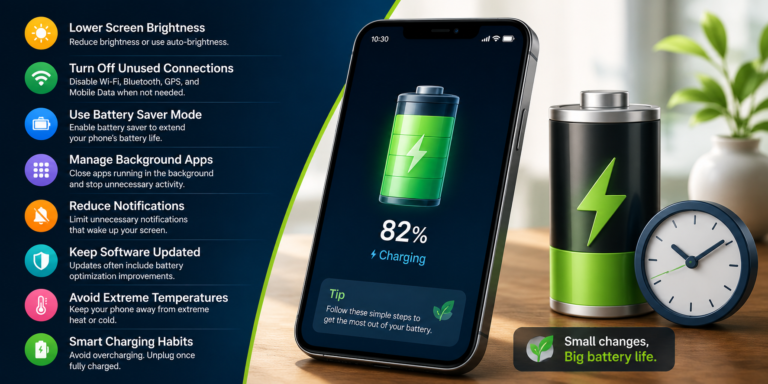
A phone that constantly needs charging can become annoying, especially when you are away from home or using your device throughout the day. While every battery eventually loses some of its capacity, there are several simple things you can do to make your phone battery last longer between charges.
If you are wondering how to make your phone battery last longer, start by looking at the features and apps that consume the most power. Screen brightness, background activity, location services, weak mobile signals, and demanding apps can all affect battery life.
Here are some practical ways to get more time from your phone each day.
1. Reduce Screen Brightness
The display is one of the biggest sources of battery consumption on many smartphones.
If your screen brightness is constantly set to maximum, try lowering it to a comfortable level.
You can also enable automatic or adaptive brightness if your phone supports it. This allows the display to adjust according to the surrounding light.
You do not need an extremely bright screen indoors.
2. Use a Shorter Screen Timeout
If your screen stays on for several minutes after you stop using the phone, it is wasting battery unnecessarily.
Open your display settings and choose a shorter screen timeout, such as 30 seconds or one minute.
This small change can make a noticeable difference if you frequently forget to lock your phone.
3. Check Which Apps Are Using Your Battery
If you are also running out of phone storage, check our guide on how to free up storage on Android phone for simple ways to remove unnecessary files and apps.
If your battery suddenly starts draining faster than usual, check the battery-usage section in your phone’s settings.
You may find that one particular app is consuming much more power than expected.
Look for apps that:
- Run constantly in the background
- Use location services frequently
- Refresh content continuously
- Keep the screen awake
- Consume unusually high amounts of battery
If you rarely use an app that consumes significant power, consider restricting its background activity or uninstalling it.
4. Turn Off Features You Are Not Using
Wireless features can consume power when they are active unnecessarily.
When you do not need them, consider turning off features such as:
- Bluetooth
- GPS or location
- Mobile hotspot
- NFC
- Wi-Fi scanning
You do not need to disable everything all the time. The idea is simply to avoid leaving unnecessary features active when you are not using them.
5. Use Battery Saver Mode
Most modern Android phones and iPhones include a battery-saving mode.
Depending on your device, it may reduce background activity, limit certain visual effects, and change how frequently apps refresh.
Turn it on when your battery is getting low and you still need your phone to last for several more hours.
Some phones also allow you to configure battery-saving mode to activate automatically at a chosen percentage.
6. Keep Your Phone Updated
Software updates can include performance improvements and fixes that affect battery consumption.
Check your phone regularly for available operating-system updates.
You should also keep frequently used apps updated because developers sometimes release fixes for apps that use excessive battery power.
However, if battery drain starts immediately after an update, give the phone some time to finish background tasks before assuming there is a permanent problem.
7. Avoid Extreme Temperatures
For more detailed information about smartphone battery safety and charging, see Apple’s official Battery and Performance guidance
Very high or very low temperatures can affect smartphone batteries.
Try not to leave your phone in direct sunlight, inside a hot car, or next to a strong heat source.
If your phone becomes unusually hot while charging or using a demanding application, allow it to cool down.
Keeping the device at a moderate temperature is better for both everyday battery performance and long-term battery health.
8. Limit Background App Activity
Some applications continue working even when you are not actively using them.
Social media, shopping, news, and messaging apps may refresh content in the background.
If your phone provides background-usage controls, review apps that consume significant power and restrict unnecessary activity.
Be careful with essential messaging or communication apps because restricting their background activity may delay notifications.
9. Reduce Unnecessary Notifications
Every notification can wake your screen, trigger sounds or vibrations, and sometimes activate background activity.
If you receive dozens of notifications that you do not care about, turn off the unnecessary ones.
Keep alerts for important apps while reducing notifications from services that do not need your immediate attention.
This can also make your phone less distracting.
10. Use Dark Mode When It Makes Sense
Dark mode can reduce power consumption on phones with OLED or AMOLED displays, particularly when a large portion of the screen is black or very dark.
It may not provide the same benefit on every type of display, but it can still be a comfortable option for nighttime use.
If you prefer dark mode, enabling it is an easy change that requires little effort.
11. Avoid Unnecessary High-Performance Features
Features such as high refresh rates, demanding games, constant GPS tracking, and intensive camera use can consume substantial power.
If battery life is more important than maximum performance, check whether your phone allows you to lower the display refresh rate or adjust performance settings.
You can always switch back when you need the extra performance.
12. Replace an Old Battery When Necessary
Sometimes the problem is not your settings or apps. The battery itself may simply be worn out.
Lithium-ion batteries gradually lose their ability to hold a full charge after repeated use.
If your phone is several years old and the battery percentage drops quickly even when you are doing basic tasks, a battery replacement may be worth considering.
For safety, use a qualified repair service and a compatible replacement battery.
What Drains Phone Battery the Most?
Battery consumption varies from one phone to another, but some activities commonly use more power than others.
These include:
- High screen brightness
- Video streaming
- Mobile gaming
- GPS navigation
- Video recording
- Mobile hotspot use
- Poor cellular reception
- High refresh-rate displays
- Apps running heavily in the background
If your battery is disappearing quickly, start by checking which of these activities you use most often.
Does Closing Apps Save Battery?
Not always.
Constantly opening and closing apps can sometimes use more power than simply allowing the operating system to manage them.
Modern smartphones are designed to manage background applications automatically.
Instead of manually closing every app, focus on applications that are genuinely consuming excessive battery in the background.
How to Make Your Phone Battery Last Longer While Traveling
If your phone is running slowly as well as losing battery quickly, you can also read how to speed up a slow Android phone for practical troubleshooting tips.
Battery life becomes particularly important when you are traveling.
Before leaving, fully charge your phone and consider carrying a power bank.
You can also:
- Lower screen brightness
- Download maps for offline use
- Use battery saver mode
- Turn off unnecessary wireless features
- Reduce video streaming
- Avoid constant location tracking
- Keep your phone away from extreme heat
These steps can help you avoid running out of battery when you need your phone most.
Should You Charge Your Phone Overnight?
Modern smartphones have charging systems designed to manage charging automatically, but charging habits can still affect long-term battery health.
If your phone supports optimized or adaptive charging, consider enabling it.
More importantly, avoid exposing the phone to excessive heat while it is charging. Heat is generally more concerning for battery health than simply leaving a modern phone connected to a charger.
Final Thoughts
Learning how to make your phone battery last longer is mostly about reducing unnecessary power consumption and keeping the battery in good condition.
Start with the basics: lower the screen brightness, shorten the screen timeout, check battery-hungry apps, reduce unnecessary background activity, and use battery saver mode when needed.
If the battery is old and continues to drain quickly despite these changes, the battery itself may need professional replacement.
Small adjustments can make your phone last considerably longer throughout the day while also helping you get more useful life from the device.
