

Smartphones contain some of our most private information, including personal messages, photos, passwords, banking details, and social media accounts. That is why noticing unusual phone behavior can be worrying.
If your phone suddenly becomes slow, the battery starts draining unusually fast, or you notice apps you do not remember installing, you may wonder: how to know if your phone is hacked?
The good news is that unusual behavior does not automatically mean someone has hacked your phone. Many problems are caused by outdated software, battery wear, buggy apps, or insufficient storage. However, several warning signs deserve attention.
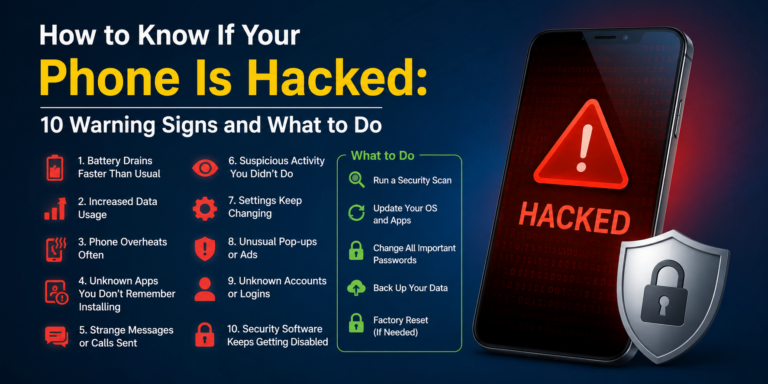
How to Know If Your Phone Is Hacked
There is no single sign that proves a phone has been hacked. Instead, look for several unusual changes happening around the same time.
Here are some of the most common warning signs.
1. Your Phone Becomes Unusually Slow
A sudden performance drop can be one warning sign.
If your phone was working normally but has recently become extremely slow, freezes frequently, or takes much longer to open apps, investigate what has changed.
However, slow performance can also happen because of:
- Low storage space
- Too many background apps
- An aging battery
- Outdated software
- A problematic application
Check your storage and recently installed apps before assuming your phone has been compromised.
2. The Battery Drains Much Faster Than Normal
Battery life naturally decreases as a phone gets older. But if your battery suddenly starts disappearing much faster than usual, check which apps are consuming the most power.
An unfamiliar application running constantly in the background could be responsible.
On both Android and iPhone, you can review battery usage in the device settings and identify applications consuming unusually large amounts of power.
3. Your Phone Gets Hot When You Are Not Using It
A warm phone is not necessarily evidence of hacking.
Phones can become warm while charging, playing games, recording video, or downloading large files. But if the device repeatedly becomes hot while sitting unused, check which apps and services are running in the background.
This is especially worth investigating if the heating problem appeared suddenly.
4. You Notice Apps You Did Not Install
One of the more suspicious signs is discovering an application that you do not remember installing.
Open your app list and look carefully for unfamiliar applications. Before deleting anything, search the app’s name to determine whether it is a legitimate system component.
Some applications may have unfamiliar names but are legitimate parts of the operating system.
If you find an app that clearly looks suspicious, uninstall it if possible and review the permissions it was given.
5. You See Strange Pop-Ups
Unexpected pop-ups, especially advertisements appearing outside your normal browser activity, can indicate a malicious or unwanted application.
For example, if advertisements suddenly appear on your home screen or while using unrelated apps, investigate recently installed applications.
Do not click suspicious pop-ups asking you to install software, enter passwords, or provide payment information.
6. Your Accounts Show Unusual Activity
Sometimes the biggest clue is not the phone itself but one of your online accounts.
You may notice:
- Password-reset emails you did not request
- Login alerts from unfamiliar locations
- Messages sent without your knowledge
- Social media posts you did not create
- New devices connected to your accounts
If this happens, change the affected account password immediately using a trusted device and enable two-factor authentication where available.
7. Your Mobile Data Usage Suddenly Increases
A sudden spike in mobile data usage can have many innocent explanations, such as video streaming, automatic backups, or app updates.
However, if you cannot explain the increase, check which applications are using your data.
An unfamiliar application consuming significant background data deserves further investigation.
8. Your Phone Starts Crashing or Restarting
Frequent crashes and unexpected restarts can be caused by software bugs, overheating, insufficient storage, or hardware problems.
But if these problems begin immediately after installing an unfamiliar application, consider removing that app and updating your operating system.
Keeping your phone’s software updated can also fix known security vulnerabilities.
9. Friends Receive Strange Messages From You
This can be a particularly important warning sign.
If friends tell you that they received strange messages, links, or social media posts from your account that you never sent, your account credentials may have been compromised.
Remember that this does not necessarily mean the entire phone was hacked. Someone may simply have gained access to a particular online account.
Secure the affected account and review its logged-in devices and recent activity.
10. Your Settings Change Without Your Permission
Pay attention if important settings suddenly change without you doing it.
For example, you might notice:
- Unknown accessibility services enabled
- Strange browser settings
- Unfamiliar device administrators
- New VPN configurations
- Changed account recovery information
- Apps receiving permissions you never granted
Do not ignore unexplained security-related changes.
What Should You Do If You Think Your Phone Is Hacked?
Before changing your passwords, you should also learn how to protect your online accounts from unauthorized access.
If several warning signs appear together, take action rather than panicking.
1. Update Your Phone
Install the latest operating-system and security updates available for your device.
Updates often contain security fixes as well as performance improvements.
2. Remove Suspicious Apps
Review recently installed applications and remove anything you do not recognize or trust.
Download applications only from official app stores whenever possible.
3. Change Important Passwords
Use a trusted device to change passwords for your most important accounts, especially your email, banking, social media, and cloud-storage accounts.
Avoid reusing the same password across multiple services.
4. Turn On Two-Factor Authentication
Two-factor authentication provides an additional layer of protection even if someone obtains your password.
Use an authenticator app or another secure authentication method when available.
5. Check Your Account Sessions
Many services allow you to see devices currently signed into your account.
Sign out of devices you do not recognize and review recent login activity.
6. Review App Permissions
Check which applications have access to your camera, microphone, location, contacts, photos, and files.
Remove unnecessary permissions from applications that do not need them.
7. Consider a Factory Reset
If serious problems continue after removing suspicious applications and updating the device, a factory reset may be appropriate.
Before doing this, make sure important photos, contacts, documents, and other data are backed up safely.
A factory reset removes the device’s apps and personal data, so it should be treated as a last-resort troubleshooting step rather than the first thing you do.
Can Someone Hack Your Phone Without You Knowing?
Yes, unauthorized access can sometimes happen without an obvious notification.
Attackers may rely on stolen passwords, malicious applications, phishing messages, compromised accounts, or outdated software.
However, it is important not to mistake ordinary phone problems for hacking. A weak battery, full storage, poor network connection, or buggy application can produce symptoms that look suspicious.
The best approach is to investigate the evidence rather than assuming the worst.
How to Prevent Your Phone From Being Hacked
For additional mobile security guidance, users can also review the official recommendations from the Cybersecurity and Infrastructure Security Agency (CISA)
You can reduce your risk with a few basic security habits:
- Keep your phone updated.
- Use a strong screen lock.
- Avoid installing apps from unknown sources.
- Use unique passwords for important accounts.
- Enable two-factor authentication.
- Avoid clicking suspicious links.
- Review app permissions regularly.
- Do not share verification codes with anyone.
- Use secure Wi-Fi networks when possible.
- Back up important information regularly.
Final Thoughts
Knowing how to know if your phone is hacked starts with recognizing unusual behavior and checking the evidence carefully. A rapidly draining battery, overheating, strange pop-ups, unfamiliar apps, unusual account activity, or unexpected settings changes can all be reasons to investigate.
At the same time, none of these signs alone proves that your phone has been hacked. Many ordinary software and hardware problems can cause similar symptoms.
The safest strategy is to keep your device updated, remove suspicious applications, secure your online accounts, enable two-factor authentication, and regularly review your phone’s security settings. These simple habits can make your smartphone significantly harder for attackers to compromise.
